FaceTime
I have been doing video calls on my Nokia phones over 3G/3.5G although the compression ratio may be high and video quality is not as good as FaceTime. Front-facing cameras have been around for years on phones so Apple is not breaking new ground here.

The notable difference here is that Apple is offering this technology in open source format, so I hope this does not only work between two iPhone 4 units for long which sounds more like a marketing strategy now.
Android phones can use Skype and Fring for this with any other phones with the same app.
Retina Display
This technology is very impressive, possibly making the iPhone to have the more defined display quality on a portable electronic display, but I’m not personally bought on this.
To me, the phone is a daytime companion that handles my communication and multimedia needs. It should complement my daily routine, not be in the centre of it. There should be a practical physical size limit to a display on the phone because our hands and pockets don’t grow continuously. Thus, how much more resolution can you fit into the same display size? At 300dpi, does it really make a difference in viewing text and images? Personally, I’m not going to spend more time than necessary staring at my phone’s screen, which is no more than an hour.
Battery runtime is also directly and significantly related to display properties. I’m happier with a small but comfortable size with efficient lighting. This is where I believe AMOLED displays used in most Android phones outshine Apple’s.
Perhaps this is attractive to folks who read a lot on their devices, especially during transit.
Multitasking
Nothing new here too. I’ve seen Android phones with over ten apps running simultaneously with negligible performance impact.
However, the Android design by default does not require apps to close when they are no longer needed, which takes a mind set change to get used to. This remains to be seen how iOS 4 handles this.
I wonder if double-tapping on the Home button for this will soon wear it out?
HD Video Recording and Editing
Again with the same reasons for Retina Display, I don’t want to spend time messing with my videos on my phone. My life doesn’t revolve around the phone. If I want to enjoy 720p or 1080p video, I’d do it on my large wide screen display with hi-definition audio without sticking my hand up the whole time.

To record HDV, I’ve got my videocam with a better sensor and optics.
I wouldn’t need this on Android as well, but in both cases it would be nice if they can wirelessly send the video playback to a TV.
The geeks at xda-developers just hacked the Nexus One to record in 720p video…
5-Megapixel Camera with LED Flash
Come on… LED flash? Just how long does it take for manufacturers to use ultra-low light sensors and wireless flash?
Wait a minute, are we talking about a camera or a phone here? Right.
9.3mm Thick
Being the thinnest smartphone isn’t a good thing. Do you want to hold a sheet of paper to your face? Steve, we live in a 3D world and our hands are actually big squishy stuff that grab things.
Aluminosilicate Glass Front and Back / Stainless Steel Band
The technology in the band is impressive, but the length and shape of it is not. Together with the two glass pieces, I have doubts on the durability of the construction. The iPhone 4 just feels like a window frame to me, which protects against two axes of pressure.
Now, the HTC Legend and a long-forgotten xda are superior here. They are aluminum enclosures which support pressure from all three axes. Aluminum is lighter, typically by three times. The Legend is even machined out of a metal unibody, like the Apple PowerBooks.
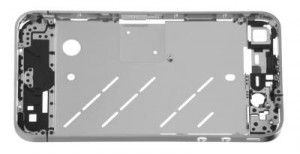
Steel does present better strain rate sensitivity and fatigue performance, but is attracted to magnetic fields. In the case of the phone, this probably has a detrimental effect on the wireless sensitivity since electromagnetic waves are used here.
The fact that Steve Jobs even announced the multi-color Bumper accessory gives me second thoughts on the glass-cum-steel sandwich design and durability.
Dual-microphone Noise Suppression
This is a great feature which is found in the Google Nexus and HTC Desire phones. Clever technology that works well.
One gripe that is common to all phones about dual microphones – it benefits the other parties. Why can’t it be used to cancel ambient noise around me by feeding it to my listening speaker?
The location of the speakerphone on the iPhone 4 is weird. On my Nokia N78 and many other phones, there are stereo speakers on either side!
What do you think? Comment below.
Technorati Tags: iphone, iphone 4, apple iphone, review, feature, comparison, android, phone, mobile phone