After a long time of waiting for my Google Adsense publisher earnings to accumulate, I’ve finally received my first payment from Google via Western Union Quick Cash method. The feeling of getting paid a three-figure for publishing online ads is satisfying and honorable. It’s not often that I get noticed by a billion-dollar company once in a while. :)
For most of us publishers residing in Asia where Western Union remittance is common, I’d recommend using Western Union Quick Cash to get paid easily. In your Google Adsense account, go to “My Account” -> “Account Settings” -> “Payment Details“, select “Setup Western Union Quick Cash” and follow the wizard.
If you have set for payment to be released (under “My Account” -> “Payment History“), your earnings will be sent to you by the end of the month after your account balance reaches your payment threshold (usually US$50). I saw that mine was issued on 24 December 2007, but I didn’t realize until I checked the page a week later. Somehow, Google Adsense did not notify me by e-mail, which I expected.
You will be able to see the payment details in this page, such as the payment date, money transfer control number (MTCN), and payment amount. Print out a statement of these details by clicking on the link at the bottom “Statement of Earnings”. Go to your nearest Western Union branch with these details and a government/state issued identity document. Fill up the Western Union Money Transfer “To receive money” form, where you will need to use the printed statement for the sender (Google) details such as its address and MTCN.
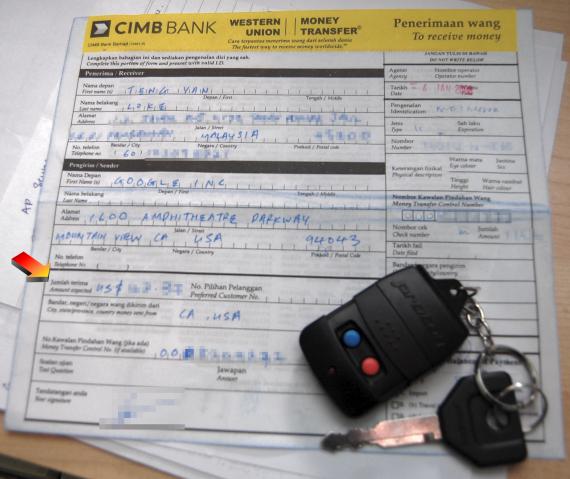
Here is the form from CIMB Bank Malaysia which has Western Union services in most, if not all, branches. CIMB is, like most other banks in Malaysia, horrendously slow. I had to wait more than an hour with four customers ahead of me.
Western Union and the bank takes a cut of about 0.9%, according to the prevailing US currency exchange rate. They pay cash in local currency.
Some of you may ask, what are my tips for making money using Google Adsense. I’ll share three tips here.
- Build a good source of content that is fresh, relevant, and pleasantly-presented. Remember that ads are meant to help lead visitors to useful products and services which will make the experience of going to your site more valuable.
- Optimize the context and placement of the ads (e.g. using “google_ad_section” tags), check out Google Adsense Help for more information on how. Large rectangles, vertical banners and link units are the best, YMMV.
- Make use of channels to help monitor the performance of different types of ads (according to site, format, placement, etc.) so that you can take action as per tip #2.
I’ve yet to see my earnings payment from Nuffnang Malaysia, but meanwhile if you have a good experience with Google Adsense or more tips on using Google Adsense, share them here by adding a comment.
Technorati Tags: google, google adsense, make money, earnings payment, western union, quick cash, money transfer control number, cimb bank, ad earnings