This is a classic and possibly the biggest lesson the current Malaysian government has learnt in terms of recognizing and leveraging on local business talents. Robert Kuok has 20% of the global sugar market, owns the Shangri-la luxury hotel chain, and produces the leading cooking oil for the Chinese population.
Think about the losses our country may be bearing because of the government’s mistakes:
Thousands of jobs
Investment capital
Exchange market size & international expansion
Export market & brand value
Mr Kuok has added to the sad statistic of hardworking and talented Malaysians who have lost faith in Malaysia and its current leaders.
As Bersih is happening right now on 9 July 2011 in the Klang Valley, Malaysia, I applaud those who stand up to the injustice and wrong-doings of our country’s leadership. As long as you are persecuted yet still fight for your rights, you are doing the right thing.
I believe in human rights, in the human need to fight for your place in this world. At the same time, the Earth is full of evil people who will stop us and resort to violence and intimidation. I say we demonstrate our beliefs like how Mohandas Ghandi did:
“When I despair, I remember that all through history the way of truth and love has always won. There have been tyrants and murderers and for a time they seem invincible, but in the end, they always fall – think of it, always.”
This is the list of confirmed road blocks around the city as of Friday 8 July 2011:
Istana Negara
Jalan Syed Putra
Jalan Istana
Jalan Bukit Petaling
Jalan Bellamy
… and areas surrounding the Istana Negara
National Mosque (Masjid Negara)
Jalan Sultan Hishammudin
Jalan Lembah Perdana
Jalan Chenderasari
.. and areas surrounding the National Mosque
Areas surrounding Merdeka Square (Dataran Merdeka)
Whether you are going to KL this afternoon, please stop reading tyrannic propaganda (i.e. The Star, The Sun, Berita Harian), spread the truth of our country and government, open your minds and exercise your power to vote. Vote for your right and your future.
As I have quoted before from Edmund Burke:
“All that is necessary for the triumph of evil is that good men do nothing.”
If you often encounter the dreaded “Phone storage is getting low” notification on your Android 2.2+ phone and have already tried using “Manage applications” (under “Menu” -> “Settings” -> “Applications“) and/or “App 2 SD” to remove apps, move apps on phone storage to the SD card, or cleared the cache, you can try the following procedure to move even more “phone-only” apps to your SD card.
I have used this to gain about 30MB of phone storage by moving huge apps such as iGO (17MB), Skype (4MB) and fring (3MB). Although some of these apps have not been configured/enabled by their developers to be installed on the SD card, the procedure overcomes this by using a powerful tool called Titanium Backup.
Not every app should be moved to the SD card. You should not move system or ROM apps such as GMail, Internet, or Youtube. Apps with widgets should be avoided as well, since the widgets will break on your home screens if you move them.
When you have Titanium Backup on your phone, it can also perform detailed backups of your apps and data and remove ROM or manufacturer-installed apps (aka bloatware). Another three apps below allow you to download and purchase apps from Market if you are in a country or with an operator with limited Market access.
Warning: please make a full backup of your phone before attempting this procedure. I am not responsible for any outcome resulting from this procedure.
Market-Enabler by Andrea Baccega and Tim Strazzere (download link)
Procedure:
Go to “Menu” -> “Settings” -> “Applications” -> “Development” and check/enable “USB debugging“.
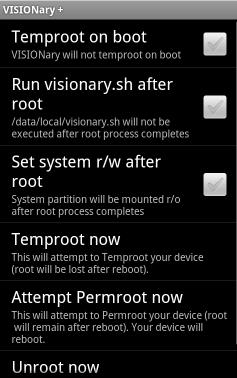
Download and install VISIONary+. Launch VISIONary+ and click “Temproot now“. The display will show an icon and some text indicating its progress and return back to the menu. Go back to your home screen.
VISIONary+
Download and install Superuser. You may launch Superuser to look at its interface, but there’s nothing you need to do there at this point.
Superuser
Download and install Titanium Backup. Launch Titanium Backup and Superuser will interrupt with the following screen (not the exact wording here, just an example). Tap “Allow” to grant Titanium Backup temporary superuser/root access.
Superuser in Titanium Backup
Titanium Backup will now gather the list of apps installed on your phone (dialog will indicate “Building exact app size information“), which may take a few minutes to complete.
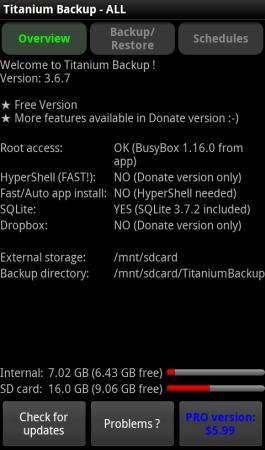
Tap “Problems?” button at the bottom, and tap “Yes, do it“. This downloads an additional tool called busybox into Titanium Backup’s data.
Titanium Backup
Note the amount of free phone storage just above the bottom row of buttons, labelled “Internal“. The next few steps should attempt to increase the free amount.
Tap “Backup / Restore” button at the top, you will see the list of apps that you can backup, remove and other operations.
For each app that you want to move to SD card, tap the app and tap “Move to SD card“. After a while, the app will be moved from your phone storage to the SD card. You can note the additional free space gained in Titanium Backup.
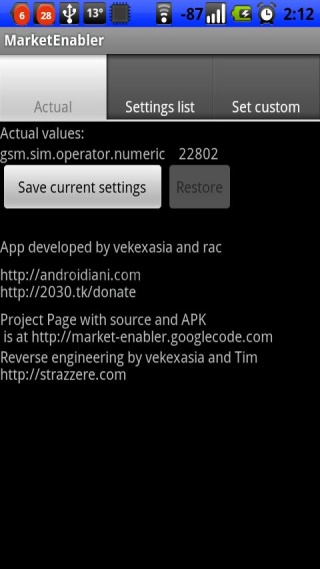
Optional – If your Market is limited, download and install Market-Enabler. Tap “Settings list” on top and select one of the more popular (read US) operators to fake your phone to. Go back to Market and see if you can search for and download more/premium apps.
Market-Enabler
I managed to go from 9MB phone storage available to 40MB, which gives more space for data-intensive apps such as Google Maps, Google Reader, Internet and Opera Mini. Hope this helps you, enjoy!